
ChatGPT Business Hub: how to register your company on ChatGPT
ChatGPT Business Hub: how to register your company
ChatGPT Business Hub: How to Register Your Company on ChatGPT
By Bull Digital · Updated on November 17, 2026
The ChatGPT Business Hub is the area where eligible companies can claim their profile on ChatGPT. After the required verifications, it is possible to update business information and track aggregated data on mentions, website clicks, and discovery topics. The feature is in beta, and availability varies by country, business type, and accepted verification methods.
If you want to know how to register your company on ChatGPT, the first step is to search for its name in the Business Hub. If you find the correct profile, you can request access to manage it. If it doesn't appear, the option to create a profile will only be available to certain eligible businesses. OpenAI announced the feature on November 10, 2026. Official OpenAI announcement.
What is the ChatGPT Business Hub and what is it for?
The Business Hub is OpenAI's dashboard for managing a company's presence on ChatGPT. It brings together three tasks that are often confused:
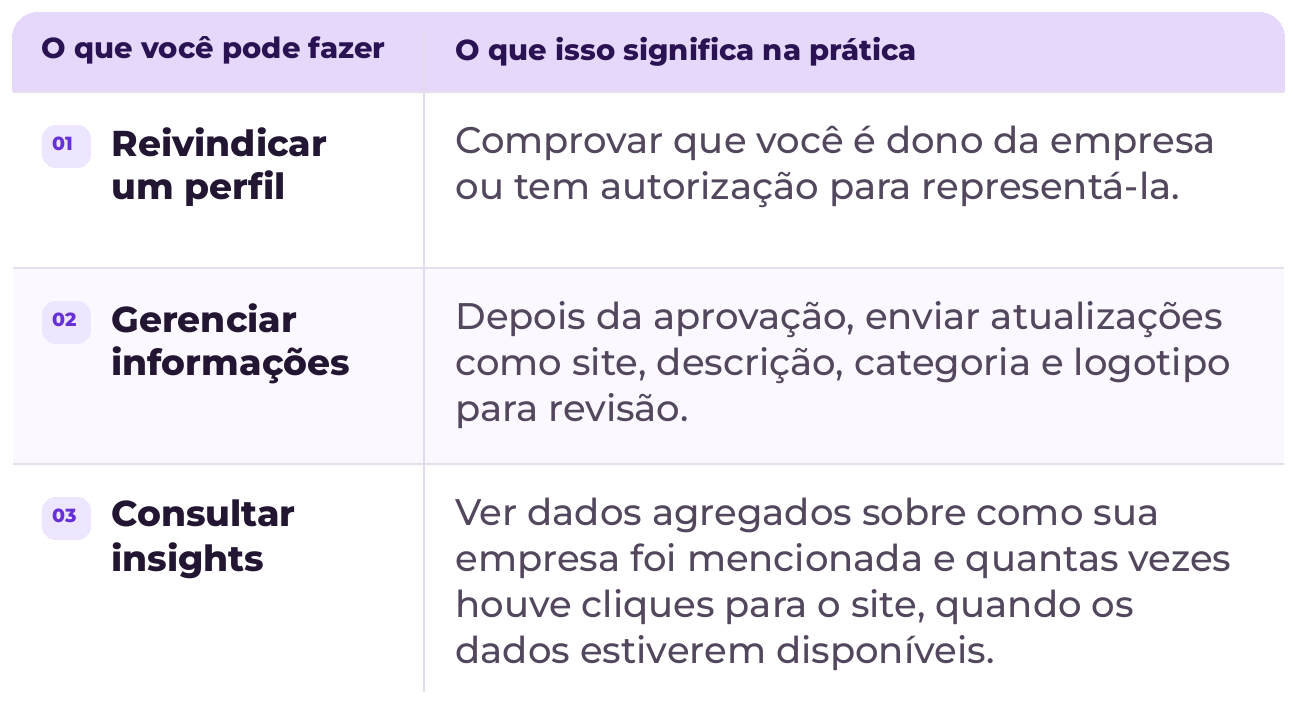
Claiming and creating are not the same thing. Claiming is taking over the management of an existing profile. Creating is starting a new profile when the platform offers that option. Neither action buys space in ChatGPT responses nor guarantees that the AI will recommend your brand. OpenAI Help Center.
Is the ChatGPT Business Hub available in Brazil?
Eligible Brazilian companies can search for their profile in the Business Hub. The ability to claim or create this profile depends on the business category, location, and accepted verifications. An online service provider in Brazil, for example, might find a path available for their business. They should not assume that a physical store or a Brazilian restaurant will have the same option.
In the documentation current as of November 2026, OpenAI states that physical stores and restaurants can only claim existing local listings in the United States. Meanwhile, the creation of a Business Agent—an assistant that answers questions with information provided by the company—begins with eligible e-commerce and online service providers in the US. Having a profile and publishing an agent are distinct features. Eligibility rules in the OpenAI Help Center.
If your company operates in both Brazil and the United States, check which business or unit the listing represents before starting the process. A result with the same name is not necessarily the profile of the operation you want to manage. Compare the domain and, where available, the location and description.
How to register your company on ChatGPT in 5 steps
1. Open the Business Hub and search for the company
Log in with your ChatGPT account and access the Business Hub. Search for the company's trading name. If you don't find it at first, try the name that appears on the official website or the spelling used by customers. Compare results before selecting one, especially when the name appears in more than one city or segment.
2. Claim the correct profile or see if it's possible to create one
If the listing already exists, select it and confirm which account will manage it. If it doesn't exist, see if the platform offers the option to add your business. Not finding the profile does not, in itself, mean you can create a new one. If it has already been claimed by someone else or is blocked, use the dispute or contact flow displayed on the platform, when available. OpenAI guidelines for claiming a business.
3. Prove your link to the company
Use one of the methods offered in your account. OpenAI lists business phone, corporate email, website domain, and Shopify among the possibilities. If you choose domain verification, you may need to add a TXT record to your DNS. If the domain is managed by someone else, involve those with access before starting this step.
4. Wait for the analysis and complete identity verification
Link verification and identity verification serve different roles. The former is part of the access request. The latter, done via Persona, is required before publishing profile changes or accessing insights. Monitor OpenAI's feedback and follow the next steps shown in the dashboard. Do not consider the process complete just because you managed to send the request.
5. Review the profile before submitting updates
Check the brand name, official website, description, category, and logo. Write a description that states what the company offers and to whom. "Information security consulting for mid-sized companies," for example, provides more information than "innovative solutions to transform businesses." Direct visitors to the page that best explains your offer. Changes may undergo review and take time to appear. OpenAI profile verification and update process.
Can you see how many clicks ChatGPT sent to your website?
Yes. When data is available, the Insights tab of the Business Hub shows aggregated activity from the last 28 days. The metrics answer different questions. OpenAI documentation on profile insights.
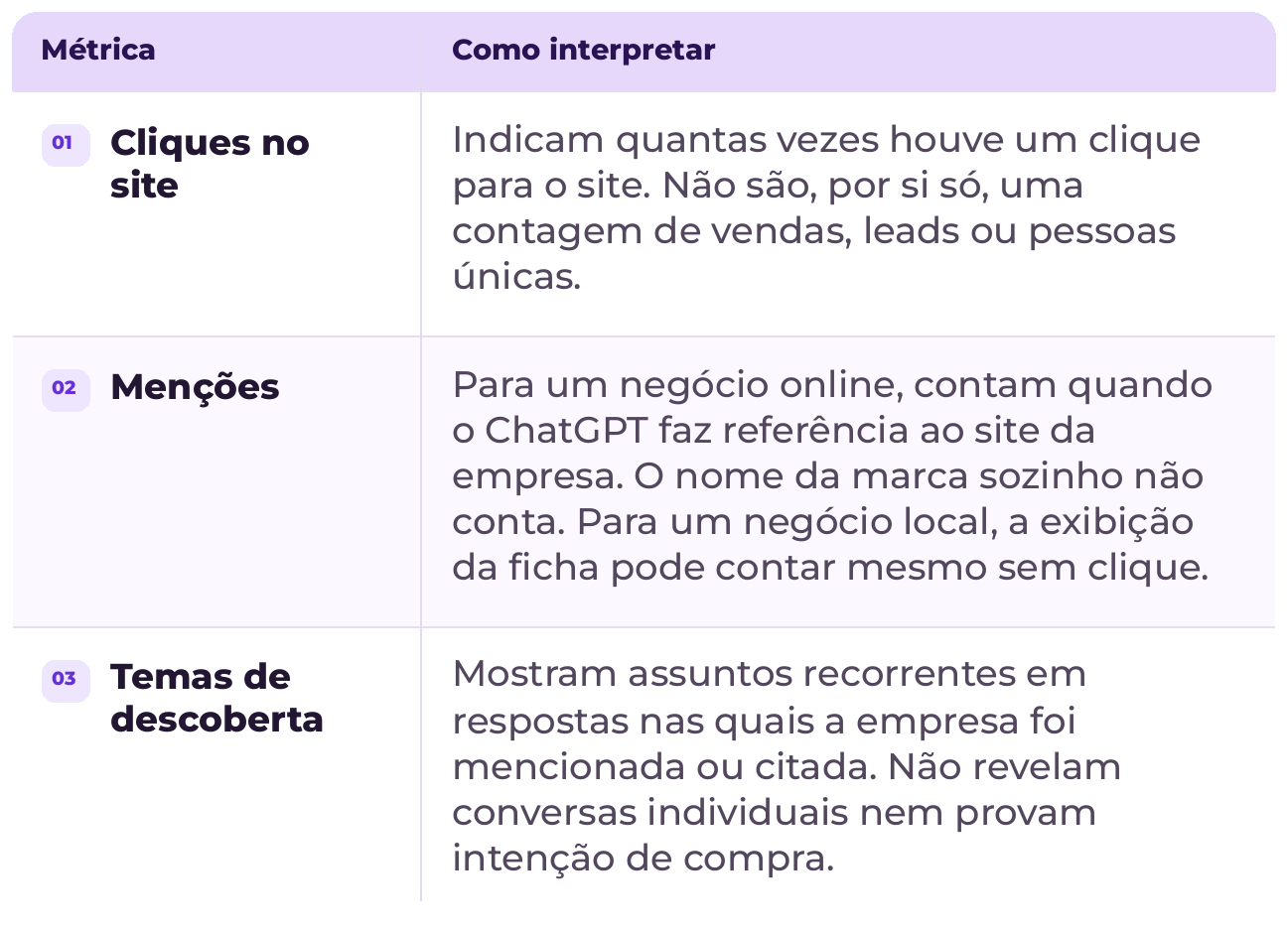
If a metric is blank, do not automatically read it as zero. There may be a minimum activity threshold, data in processing, or report unavailability. And if the dashboard records 30 clicks, the number does not have to be identical to the sessions measured by your analytics. A click and a session are different events. Compare equivalent periods and use the data as a supplement, not as an exact reconciliation.
How to connect the Business Hub to your SEO and GEO strategy
The utility of the Business Hub goes beyond registration. It offers a clue as to which topics are already bringing the audience closer to your brand. In practice, this information can help in choosing the next content or correcting a page that does not answer the questions of those who are searching well.
Start with the questions that precede hiring. If discovery topics indicate questions about integration, price, or deadlines, compare these topics with Google Search Console queries and questions reaching the sales team. When the same question appears in more than one channel, there is a good reason to answer it on a dedicated page or improve an existing page.
Provide a useful answer before presenting your offer. On a page about CRM integration, explain which systems are compatible, what access the project needs, and in which cases a custom integration makes sense. If the price varies, say what changes the budget. This type of detail helps those comparing suppliers and makes the information easier to interpret out of the page's context.
Check if the page is easy to find and understand. Create internal links from related services and content, use descriptive titles, and keep main points in text, even when there is a video. If the site has Portuguese and English versions, make it clear in each one where the company operates and what it offers in that market.
Measure each step in the right place. Use Search Console to track impressions and clicks in Google search, Business Hub to observe ChatGPT data, and analytics or CRM to measure website actions and qualified leads. Do not sum these metrics as if they were the same indicator. Look at them together to decide what to investigate and where to improve.
In other words, strategic SEO helps make a page findable and useful for searchers. GEO applies this same care to the context of AI-generated responses, with clear, verifiable, and specific information. Google advises that SEO best practices remain valid for its AI features and that no special schema is required to participate in these experiences. This does not guarantee display on Google or recommendations on ChatGPT. Google Search Central guidelines on AI features.
To delve deeper into this difference, see what we already know about GEO and optimization for AI searches.
Frequently asked questions about ChatGPT Business Hub
Do I need to advertise to register my company on ChatGPT?
No. OpenAI states that an eligible company does not need to have an ad account or a ChatGPT Enterprise contract to claim a profile. Advertising, managing the profile, and publishing a Business Agent are separate actions. If you want to understand the paid media channel, see how ChatGPT Ads works in Brazil.
Does registering my company make ChatGPT recommend it more often?
There is no such guarantee. The profile allows you to manage the information your company provides. ChatGPT may consider other sources and continues to generate its responses independently. Use the registration to improve data accuracy, not as a promise of ranking.
Does the Business Hub replace the Google Business Profile?
No. The Business Hub is focused on the company's presence on ChatGPT. The Google Business Profile has another function, linked to presence on Google Search and Maps. If you manage both, it's worth reviewing if the domain, contacts, and information applicable to each unit are consistent. For those serving in person, a local SEO strategy for Google Search and Maps remains a separate front.
What to do if my company doesn't appear in the Business Hub?
Try the business name used on the website and check if there isn't a listing with another spelling. If the option to create a profile doesn't appear, consult the eligibility documentation. In the meantime, keep your official website updated, starting with pages that explain what you offer, to whom, and in which markets. Business Hub FAQs and settings at OpenAI.
Where to start?
Search for your company in the Business Hub. If there is an eligible profile, claim it and review the information before publishing changes. In parallel, choose an important page on your website and check if it explains what you offer with the same level of clarity your sales team would use in a first conversation.
Want help setting up your profile or understanding how your brand is found in searches and AI responses? Contact Bull Digital.